ENEnglish
 LTLietuviškai
 DEDeutsch
 FRFrançais
 RUРусский
 ESEspañol
 PLPolski
 ITItaliano
 UKУкраїнська
 CSČeština
 PTPortuguês
 JA日本語
JA日本語 LVLatviešu valoda
 ETEesti
 HUMagyar
 IDBahasa Indonesia
 TRTürkçe
 HIहिन्दी
 ELΕλληνικά
 ARالعربية
 THไทย
THไทย VITiếng Việt
 RORomână
 MSBahasa Melayu
 BNবাংলা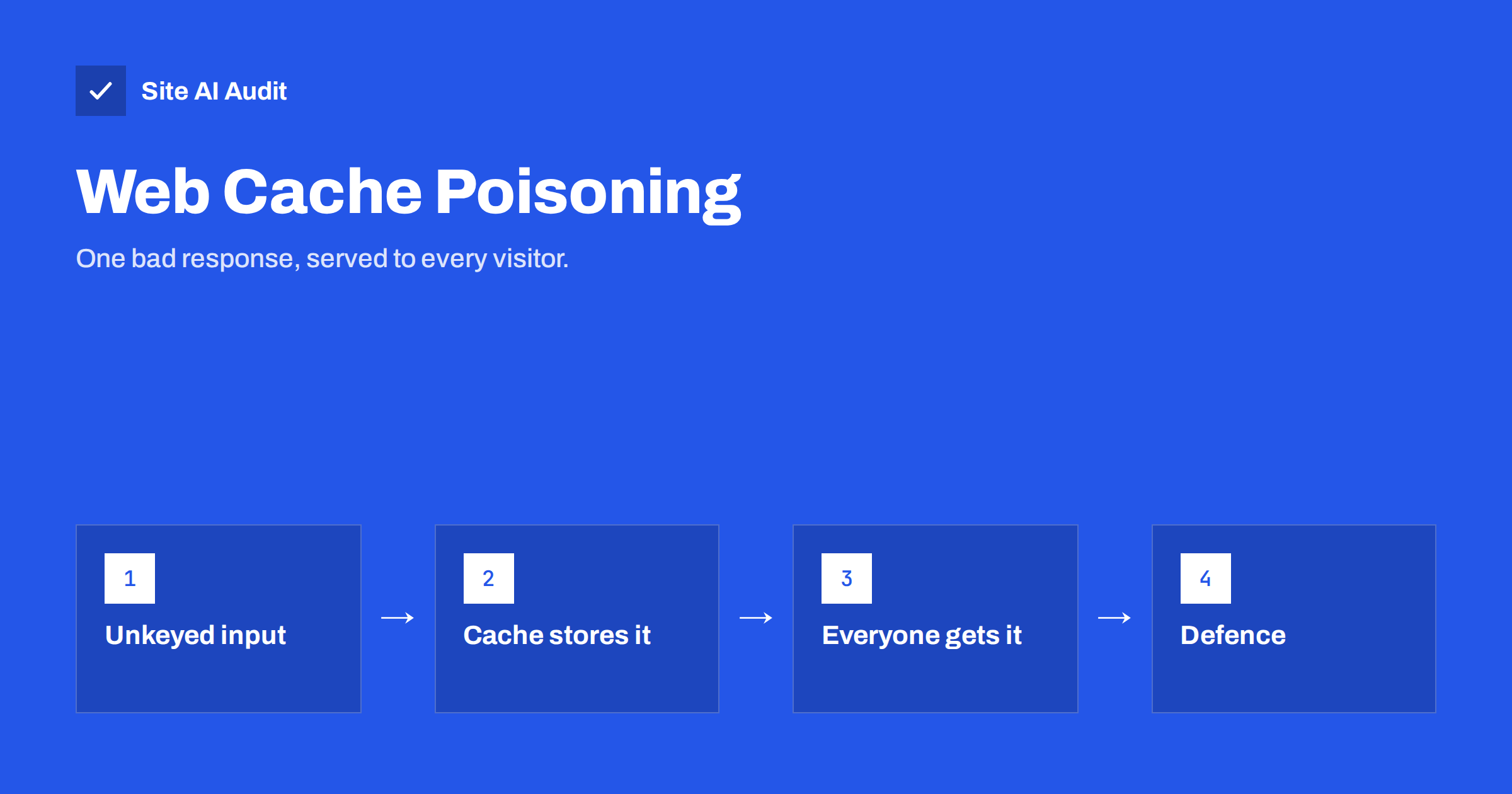
Short answer: A cache stores a copy of a page and serves it to the next visitors without asking the application again. Web cache poisoning is an attack where someone sends a request that makes your application produce a harmful response, for example a page with an injected script or a wrong link, and the cache stores that response and serves it to everyone until it expires. It works when the application uses parts of the request that the cache ignores, such as certain headers. The defences are to make the cache aware of every input that changes the page, to stop the application from reflecting untrusted request data, and to keep cache rules strict and simple.
How caches decide what to store
A CDN, a reverse proxy or a caching plugin keeps copies of responses so that repeat requests are fast. To decide whether a stored copy matches a new request, the cache builds a key from parts of the request, typically the host and the path, and sometimes a few query parameters or headers. Everything not in the key is ignored for matching purposes: two requests that differ only in an unkeyed part are treated as the same page.
That is normally fine, because most unkeyed parts, such as the browser version, do not change the page. The problem begins when the application does use one of those parts to build the response. Then the cache stores a response that was shaped by one visitor’s request and serves it to everyone who matches the key.
Our articles on page caching and CDN cache hit ratio explain how keys and hit rates work in everyday terms.
How the attack works
- Find an unkeyed input that changes the page. Classic examples are headers that tell the application which host or protocol to use when building links, such as forwarded host headers, or headers that influence language, currency or layout. Query parameters that the cache strips from the key but the application reads also qualify.
- Craft a request that puts something harmful into that input: a domain controlled by the attacker, a script fragment or a redirect target.
- Get the response cached. The attacker sends the request at a moment when the cache has no fresh copy, so the poisoned response becomes the stored one.
- Wait. Every visitor who requests that page now receives the poisoned version from the cache, for as long as the cache lifetime allows. The attacker does not need to touch those visitors at all.
A common real-world case is an application that builds absolute links from a forwarded host header. The attacker sets that header to their own domain; the cached page now loads a script from the attacker’s site. Our article on host header injection describes the single-visitor version of the same mistake; caching turns it into a problem for everyone.
What an attacker can do with it
- Serve a script to every visitor of a page, which leads to stolen sessions, fake forms or redirects to scam sites.
- Change links on the page so that visitors go to a phishing copy of your site.
- Replace a cached redirect so that your HTTPS redirect, a login link or a download points elsewhere.
- Cause a denial of service by poisoning the cache with an error response, so that visitors see an error page for the cache lifetime.
- Affect search results, because search engines fetch the same cached copy and may index the injected content.
The attack is attractive because it scales: one request, many victims, and the victims see a page from your real domain with a valid certificate.
Where the weak points usually are
Reflected headers. Any header that ends up in the page, in links, in canonical tags or in redirects. Forwarded host and forwarded protocol headers are the usual suspects, followed by headers used for language, geolocation and feature flags.
Parameters that the cache ignores. Some caches drop tracking parameters from the key to improve hit rates. If the application reads one of those parameters and prints it on the page, it becomes an unkeyed input.
Fat GET requests. Some applications read parameters from the request body of a GET request, which caches never include in the key.
Error pages. If the cache stores error responses, an attacker who can trigger an error for a page can make everyone see it.
Several cache layers. A CDN in front of a proxy in front of a plugin, each with its own key rules, multiplies the surface. The layer with the loosest key decides.
How to check your own site
- List your cache layers and, for each, find out what is in the cache key and which headers and parameters are ignored.
- Search your application for request data in output. Look for places where host, protocol, language or other headers are used to build links, canonical tags, redirects or scripts. CMS platforms and frameworks often have a setting for the site address; use it instead of reading the request.
- Test with a cache-buster. Add a unique query parameter so that you get a fresh response, send a request with a modified unkeyed header, and see whether the response changes. Then check whether a normal request for the same address now shows the change. If it does, you have found a poisoning path. Do this on a staging copy or on a test page, not on busy production pages.
- Read the response headers. Cache status headers tell you whether a response came from the cache and how long it stays. Vary headers show which request headers the cache treats as part of the key.
How to prevent it
- Do not build pages from request data you do not control. Configure the site address in the application and build links from that setting. Validate any header you must use against an allow list.
- Make the cache key complete. If a header legitimately changes the page, add it to the key with a Vary header or in the CDN’s cache rules. If it does not need to change the page, make the application ignore it.
- Strip or normalise unknown input at the edge. Configure the CDN or proxy to remove headers that your application should never trust from outside, such as forwarded headers that only your own proxy should set.
- Do not cache errors and redirects longer than needed. Short lifetimes limit the damage window for any poisoned response.
- Keep caching rules simple. Fewer exceptions mean fewer surprising gaps between what the cache keys and what the application reads.
- Use a Content Security Policy. If an injection does happen, a strict policy limits which scripts can run. See the Content Security Policy guide.
- Keep software updated. Several poisoning paths in popular frameworks and plugins have been fixed by updates. Our safe update strategy covers how to update without downtime.
If you find a poisoned cache
Purge the affected pages, or the whole cache if you are unsure, so that visitors stop receiving the bad response. Then close the path, otherwise the attacker simply poisons it again. Review logs around the time the bad response was stored to identify the request that caused it; the unusual header or parameter it carried points to the fix. Check search results for your pages in case injected content was indexed, and review other signs of compromise, because cache poisoning is sometimes combined with a deeper intrusion.
Cache poisoning versus DNS cache poisoning
The two share a name but are different attacks. DNS cache poisoning inserts false records into a DNS resolver so that a domain points to the wrong server; the defence there is DNSSEC and well-run resolvers. Web cache poisoning works inside your own site’s page cache. Our article on DNSSEC for website owners covers the DNS side.
For most small sites, the practical steps are modest: set the site address in the application instead of reading it from headers, let your CDN strip forwarded headers from outside, keep error and redirect caching short and apply updates. Those four habits remove the common poisoning paths without any change to how fast your cache makes the site.
What Site AI Audit can and cannot tell you
Site AI Audit checks your security headers, SSL certificate, HTTPS redirect and exposed software versions, and its speed results show whether pages are cached and compressed. It does not test for cache poisoning, which requires sending crafted requests, so use the manual checks above. A Content Security Policy and a clean header set, which the audit does report on, reduce what a poisoned page can do. You can run a free check of your website or see the plans.
Related reading
- Host Header Injection: How Password Reset Links Get Hijacked
- Page Caching Explained: How to Speed Up a Dynamic Website
- Content Security Policy for Beginners: A Practical Setup Guide
- Website Security Audit Checklist: What to Check and in What Order
The bottom line
Web cache poisoning turns one crafted request into a harmful page for every visitor, by exploiting inputs that your application reads but your cache ignores. Build pages from configuration rather than from request headers, make cache keys match what the application uses, strip untrusted headers at the edge, cache errors briefly and keep software current. If a cache is poisoned, purge it and close the path.
FAQ
Is cache poisoning the same as a hacked server?
No. The attacker never logs in or changes files. They make the application produce a bad response once and let the cache spread it. That is why purging the cache stops the symptom, but only a code or configuration fix stops the cause.
Does using a CDN make this more likely?
A CDN is another cache layer, so it adds surface if its key rules are loose. Most CDNs offer settings to strip untrusted headers and to control the cache key, which, when used, make the site safer than a plain cache.
How do I know which headers my cache ignores?
Check the cache documentation and the Vary header in your responses. Anything not in the key or in Vary is ignored for matching.
Can WordPress sites be affected?
Yes, when a plugin or theme builds links from request headers and a caching plugin or CDN stores the result. Set the site address in the settings and keep plugins updated.
What is the fastest fix after an incident?
Purge the cache to stop serving the bad page, then remove the application’s dependence on the unkeyed input, or add that input to the cache key.