ENEnglish
 LTLietuviškai
 DEDeutsch
 FRFrançais
 RUРусский
 ESEspañol
 PLPolski
 ITItaliano
 UKУкраїнська
 CSČeština
 PTPortuguês
 JA日本語
JA日本語 LVLatviešu valoda
 ETEesti
 HUMagyar
 IDBahasa Indonesia
 TRTürkçe
 HIहिन्दी
 ELΕλληνικά
 ARالعربية
 THไทย
THไทย VITiếng Việt
 RORomână
 MSBahasa Melayu
 BNবাংলা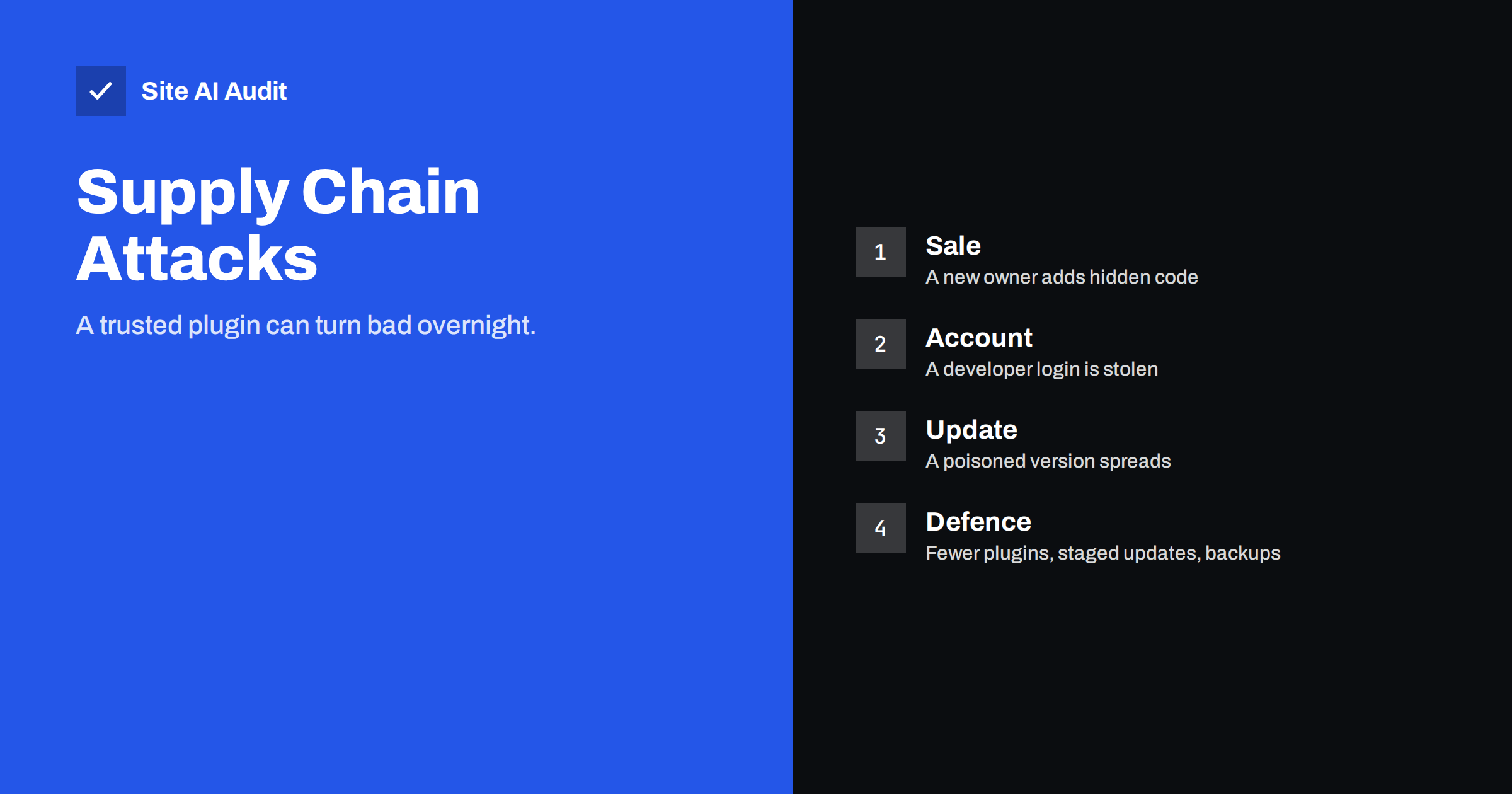
Short answer: A plugin supply chain attack happens when attackers do not break into your site directly but compromise something you already trust, such as a plugin, a theme or the developer account behind it. The next update then carries harmful code into your site. You cannot remove this risk completely, but you can reduce it by using fewer and better maintained plugins, delaying updates slightly, keeping backups and watching for unexpected changes.
What a supply chain attack means for a website
Most advice about website security assumes the threat comes from outside: someone guesses a password or exploits a bug. A supply chain attack reverses this. The site owner does everything right, installs a well-known plugin from a normal source and keeps it updated, and the harm arrives through the update itself.
The name comes from the idea that your website depends on a chain of other people’s work: the plugin author, the theme author, the library inside the plugin, the account used to publish updates and the place where updates are hosted. If an attacker takes over any link in that chain, everything downstream receives the change, usually automatically and usually trusted without a second look.
How these attacks usually happen
The details differ, but a few patterns appear again and again.
- A change of owner. Small plugins are sometimes sold or handed over when the original author loses interest. A new owner can then publish an update that adds advertising, redirects or a hidden backdoor, and existing users receive it as a normal update.
- A stolen developer account. If the login of a plugin author is guessed, reused from another breach or phished, an attacker can publish a malicious version under the trusted name.
- A compromised update server. Some commercial plugins and themes load updates from the vendor’s own server. If that server is breached, the update channel itself delivers the harmful code.
- A poisoned dependency. A plugin may include a library written by someone else. If that library is tampered with, every plugin that bundles it carries the problem.
- Pirated copies. A free copy of a paid plugin often arrives with extra code added. This is a related risk, covered in our article on nulled themes and plugins.
Why this is hard to notice
The code arrives through the same door as every genuine update, and the plugin often keeps working normally. The harmful part may be small: a few lines that create a hidden administrator, a script that loads from another domain, or a piece of code that waits for a signal before doing anything. Some versions only act for visitors who are not logged in, or only for visitors coming from search engines, so the owner never sees the problem.
Attackers also pick moments when nobody is watching. An update published late on a Friday can run on thousands of sites before anyone reports it. By the time the plugin directory removes the version, many sites have already installed it.
Warning signs after an update
A harmful update does not always announce itself, but there are clues worth checking, especially right after a change:
- New administrator accounts you did not create, or users whose role changed.
- Visitors being sent to unfamiliar pages, or ads and pop-ups that did not exist before.
- Scripts in the page source that load from domains you do not recognise.
- A sudden drop in speed, or high server load without more visitors.
- Files changed in the plugin folder, or new files in places that should not contain code.
- Search results that show strange titles or unknown pages from your domain.
The signs of an infected site are described in more detail in signs your website has been hacked, and the same checks apply here.
How to lower the risk
No single step solves the problem, but several habits together make a real difference.
Install fewer plugins
Every plugin is another link in the chain. Remove anything you do not use, and prefer a few well-maintained plugins over many small ones. The question of how many is too many is discussed in how many WordPress plugins are too many.
Check the plugin before you trust it
Look at how many sites use it, when it was last updated, how the author responds to support questions and whether the ownership has changed recently. A plugin with no updates for a long time carries its own risk, which we describe in abandoned WordPress plugins.
Delay updates for a short time
Security updates for known vulnerabilities should still be installed promptly. For ordinary feature updates, waiting a few days costs little and gives the community time to report anything wrong. A routine such as the one in a safe website update strategy adds a backup and a test step before the change goes live.
Keep working backups
If a harmful update gets through, a clean copy from before the update lets you recover quickly. Store backups away from the web server, and test that they restore. Our website backup strategy guide covers the details.
Protect the accounts that can change code
Use unique passwords and two-factor authentication on your administrator accounts, your hosting login and any vendor accounts. Remove access for former developers, as explained in developer access and offboarding.
What to do if you suspect a bad update
Act quickly but calmly. First, take a copy of the current state of the site so you can investigate later. Then put the site into maintenance mode if visitors are at risk, and change the passwords of all administrator and hosting accounts from a clean computer. Roll back to the backup from before the update, or remove the plugin entirely if you can do without it. Check the user list for accounts you did not create, scan the files for unexpected changes and look at your server logs for unusual requests.
Report the problem to the plugin author and to the official plugin directory if the plugin came from there, so that other site owners are warned. When the site is clean, update the remaining software and rotate any keys or tokens stored in the configuration. The step-by-step approach in hacked website recovery steps gives a full checklist.
Why a single scanner is not enough
Security scanners compare your files with known bad patterns. A new supply chain attack may use code that no scanner has seen yet, so a clean scan is useful but not proof. Combine scanning with other layers: logs that show who changed what, alerts for new administrator accounts and a regular look at what actually loads in your pages. The article on logging and monitoring for small sites explains how to set this up without a large budget.
A simple monthly review routine
You do not need special tools to keep an eye on your plugins. Once a month, open the list of installed plugins and ask three questions about each one. Do I still use it? Has it been updated in the last year? Does it still come from the author I chose? Anything that fails one of the questions is a candidate for removal or replacement.
Then look at the list of users and remove accounts that nobody recognises. Finally, view the source of your home page and a few other pages, and scan the list of external domains that scripts load from. A short list that you can explain is a healthy sign. A long list with unknown names deserves a closer look. Fifteen minutes of this routine catches many problems long before they become expensive.
How Site AI Audit helps
Site AI Audit does not scan the files inside your plugins and cannot tell whether a plugin update is harmful. It checks what visitors and browsers can see from outside: the security headers your site sends, the SSL certificate, the HTTP to HTTPS redirect and exposed software versions, each with a plain-language fix. Some of these, such as a strict Content Security Policy, can limit the damage if a script from an unknown domain is injected. The free check needs no sign-up, and the Monitor plan re-checks weekly and sends e-mail alerts when something breaks. You can run a free check of your website or see the plans.
Related reading
- WordPress Security Checklist: 20 Steps That Actually Matter
- Content Security Policy for Beginners: A Practical Setup Guide
- Subresource Integrity: Protect Your Site From Tampered Scripts
- Website Security for Small Businesses: Where to Start
The bottom line
Your website is only as trustworthy as the plugins, themes and accounts behind it. Keep the number of plugins low, choose maintained ones, update with a short delay and a backup, protect every account that can publish code and watch for unexpected changes. You cannot remove the risk of a bad update completely, but you can make sure that one bad update does not become a long outage.
FAQ
Can an official plugin directory plugin still be harmful?
Yes. Directories review and remove many problems, but a trusted plugin can be sold, hijacked or updated with harmful code, and the damage may happen before a removal.
Should I turn off automatic updates to be safe?
Not for security fixes, because known vulnerabilities are a bigger daily risk. A better balance is to automate security updates and review larger feature updates after a short delay with a backup in place.
How do I know if a plugin changed owner?
Check the plugin page for the author name, the changelog and recent support threads. A sudden change of author, new advertising or unexplained permission changes are reasons to look closer.
Are themes affected in the same way?
Yes. Themes are code that runs on your site, so a compromised theme update carries the same risk as a plugin. The same habits of minimal use, backups and monitoring apply.
Does a web application firewall stop this?
It may block some harmful requests, but it cannot judge code you installed yourself. Treat it as one layer among several, not as a replacement for careful updates and backups.