ENEnglish
 LTLietuviškai
 DEDeutsch
 FRFrançais
 RUРусский
 ESEspañol
 PLPolski
 ITItaliano
 UKУкраїнська
 CSČeština
 PTPortuguês
 JA日本語
JA日本語 LVLatviešu valoda
 ETEesti
 HUMagyar
 IDBahasa Indonesia
 TRTürkçe
 HIहिन्दी
 ELΕλληνικά
 ARالعربية
 THไทย
THไทย VITiếng Việt
 RORomână
 MSBahasa Melayu
 BNবাংলা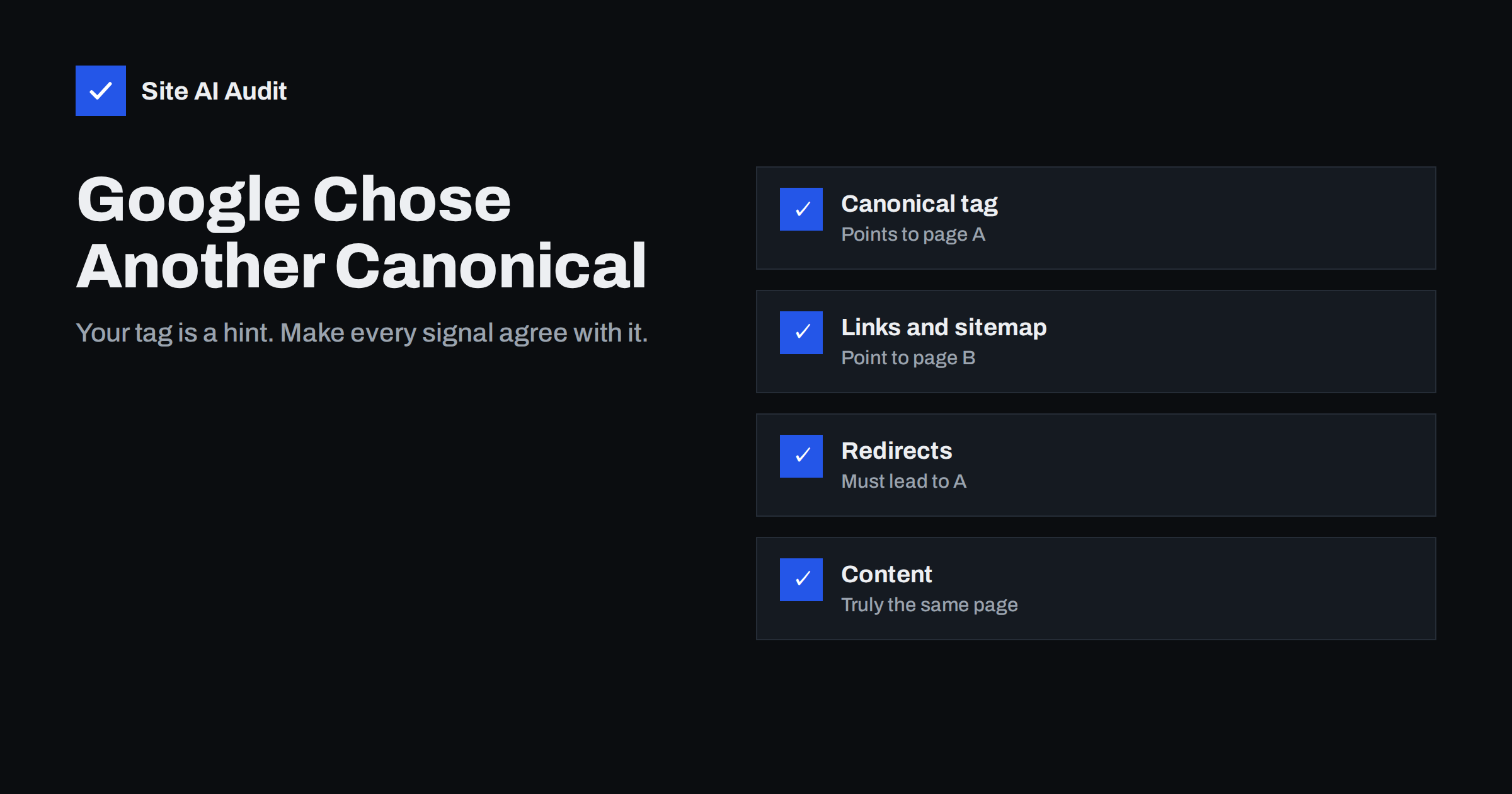
Short answer: “Duplicate, Google chose different canonical than user” means you declared a canonical URL for a page, but Google decided that another URL is the better representative and indexed that one instead. A canonical tag is a strong hint, not a command. Google overrides it when other signals, such as internal links, sitemaps, redirects, HTTPS and the content itself, point to a different URL. The fix is to make all signals agree, or to accept Google’s choice if it is actually right.
What the status means
When several URLs show the same or very similar content, Google groups them and picks one canonical URL to index and show in results. The others are treated as duplicates. You can suggest which URL should be canonical with a rel="canonical" link in the HTML, a canonical HTTP header, redirects and sitemap entries.
Search Console’s Page indexing report shows how this worked out. “Alternate page with proper canonical tag” means Google agreed with you. “Duplicate, Google chose different canonical than user” means it did not. The URL Inspection tool shows both values side by side: the user-declared canonical and the Google-selected canonical. That comparison is the starting point for every fix. If you want to compare with the friendly version of this status, see our guide to alternate pages with a proper canonical tag.
When Google’s choice is fine
Not every case needs fixing. Look at the URL Google picked:
- If Google chose a URL that is equivalent and you are happy for it to rank, for example the HTTPS version over an old HTTP address, the result may be acceptable.
- If the reported page is a parameter variant, such as a tracking or sorting URL, and Google chose the clean URL as canonical, it has made the right choice even if your tag pointed somewhere slightly different.
It needs fixing when Google chose a URL you do not want in search: a URL with parameters, a print version, a page on the wrong language or country, a staging or old domain, or a different page altogether, such as a category instead of the product.
Why Google ignores a canonical tag
Conflicting signals. The most common reason. Your canonical tag says /product/, but the menu links to /product/?colour=red, the sitemap lists /Product/ and the HTTP version redirects somewhere else. Google weighs all of these and may conclude that your tag is the outlier.
The canonical target is weaker than the duplicate. If the URL you declared returns a redirect, a 404, a noindex tag or is blocked by robots.txt, Google cannot use it as canonical and picks another.
The pages are not really duplicates. If two pages differ substantially but you point one’s canonical at the other, Google may ignore the tag. The reverse also happens: pages you consider different are so similar, such as product variants with only a different colour name, that Google merges them and chooses its own representative.
Rendering problems. If the canonical tag is added by JavaScript, appears twice with different values, sits in the body instead of the head, or a plugin outputs a different value on mobile, Google may disregard it.
Protocol and host preferences. Google prefers HTTPS URLs and URLs that other pages link to. If your canonical points to an HTTP URL or a host variant that is not used anywhere else, it loses.
Cross-domain duplicates. When the same content exists on another domain, for example a syndicated article or products from a supplier feed, Google may choose the other domain’s URL as canonical if that site is stronger.
How to diagnose a specific URL
- Inspect the URL in Search Console and note the user-declared and Google-selected canonical.
- Open both URLs and compare them. Are they the same content? Do they return 200? Does either have noindex or a redirect?
- View the source of the reported page and search for
canonical. There should be exactly one tag, in the head, with an absolute URL. - Check the rendered HTML in the URL Inspection live test to see whether JavaScript changes the canonical.
- Check internal links. Which version do your menus, breadcrumbs, product grids and related posts link to?
- Check the sitemap. Which version is listed?
- Check redirects and host variants. Do HTTP, www and non-www versions all redirect to the same final URL?
Remember that the report is a snapshot from Google’s last crawl. If you changed templates recently, the live test may already show the correct canonical while the report still lists the old state. In that case, wait for recrawling before changing anything else.
Usually one of these steps shows a mismatch. Fix the pattern in the template or configuration rather than editing individual pages.
How to fix it: make every signal point the same way
- Canonical tag. One absolute, self-consistent canonical URL per page, in the head, pointing to a page that returns 200 and is indexable. Our guide to canonical tags covers the details.
- Internal links. Link to the canonical URL everywhere, with the same protocol, host, case and trailing slash. Avoid tracking parameters in internal links.
- Sitemap. List only canonical URLs. Remove duplicates, parameter URLs and redirected URLs.
- Redirects. Use 301 redirects for host and protocol variants, so only one version exists. See our article on www, non-www and trailing slashes.
- Hreflang. On multilingual sites, each language version should be canonical to itself, not to the main language, and hreflang annotations should reference canonical URLs.
- Content. If two pages should both be indexed, make them genuinely different. If they really are the same, merge them and redirect one to the other.
When you have fixed the signals, request indexing for the preferred URL in the URL Inspection tool. Google needs to recrawl both URLs and reprocess the cluster, which can take days or weeks.
Special cases
Product variants. If each colour or size has its own URL with almost identical text, Google may pick one variant as canonical for all of them. Decide whether variants deserve their own pages. If not, canonicalise them to the main product. If they do, give each one unique content, such as specific images, descriptions and structured data.
Syndicated content. If your articles are republished elsewhere, ask the partner to add a canonical tag pointing to your original, or to use noindex on their copy. Otherwise Google may pick their version.
Paginated series. Page 2 and later of a category should not be canonicalised to page 1, because they contain different products. Each page should be canonical to itself. Our guide to pagination and SEO explains why.
Site migrations. After moving to a new domain or structure, old URLs that still return 200 instead of redirecting compete with the new ones and often win for a while.
How to prevent it on new pages
Most canonical conflicts are not created by a single bad tag but by templates that produce several versions of the same page. When you launch a new section, a shop filter or a new language, check a sample of the generated URLs before Google finds them. Make sure the menu, breadcrumbs, sitemap and canonical tag all use the same version, that filters and sorting options either have their own clear purpose or point back to the main listing, and that old versions redirect. A short check after each theme or plugin update helps too, because updates sometimes change how URLs and canonical tags are generated.
How Site AI Audit helps
Site AI Audit crawls your site and reports several signals that feed into canonical decisions: pages that do not declare a canonical URL, a site that opens on more than one address (such as with and without www, or over HTTP), links that pass through several redirects, broken internal links, and pages that share the same title or meta description, which often points to duplicates. It does not know which canonical Google selected; Search Console shows that. You can run a free check, and the pricing page lists the plans that show every affected page.
Related reading
- Duplicate Content in SEO: Common Causes and How to Fix Them
- URL Parameters and SEO: Filters, Tracking and Crawl Waste
- Hreflang Explained: SEO Basics for Multilingual Websites
The bottom line
When Google chooses a different canonical than you, it is telling you that your other signals disagree with your canonical tag, or that the declared URL cannot be used. Compare the declared and selected canonical in the URL Inspection tool, then align the tag, internal links, sitemap, redirects and content so they all point to the same URL. If Google’s choice is actually the better URL, accept it and update your tag instead.
SSS
Is “Google chose different canonical than user” a penalty?
No. It is a status that shows Google indexed a different URL from the one you declared. It only matters if the URL Google chose is not the one you want in search.
Why does Google ignore my canonical tag?
Because the canonical tag is a hint. Google overrides it when internal links, sitemaps, redirects or the content point to another URL, or when the declared URL is not indexable.
How long does it take for Google to accept my canonical?
After you align the signals, Google has to recrawl the URLs involved. That usually takes from a few days to a few weeks.
Should I use a redirect instead of a canonical tag?
If visitors do not need the duplicate URL at all, yes. A 301 redirect is a stronger signal than a canonical tag and removes the duplicate entirely.
Can a canonical tag point to another domain?
Yes, for example for syndicated content. Google may follow it if the content matches, but as with any canonical tag, other signals can override it.