ENEnglish
 LTLietuviškai
 DEDeutsch
 FRFrançais
 RUРусский
 ESEspañol
 PLPolski
 ITItaliano
 UKУкраїнська
 CSČeština
 PTPortuguês
 JA日本語
JA日本語 LVLatviešu valoda
 ETEesti
 HUMagyar
 IDBahasa Indonesia
 TRTürkçe
 HIहिन्दी
 ELΕλληνικά
 ARالعربية
 THไทย
THไทย VITiếng Việt
 RORomână
 MSBahasa Melayu
 BNবাংলা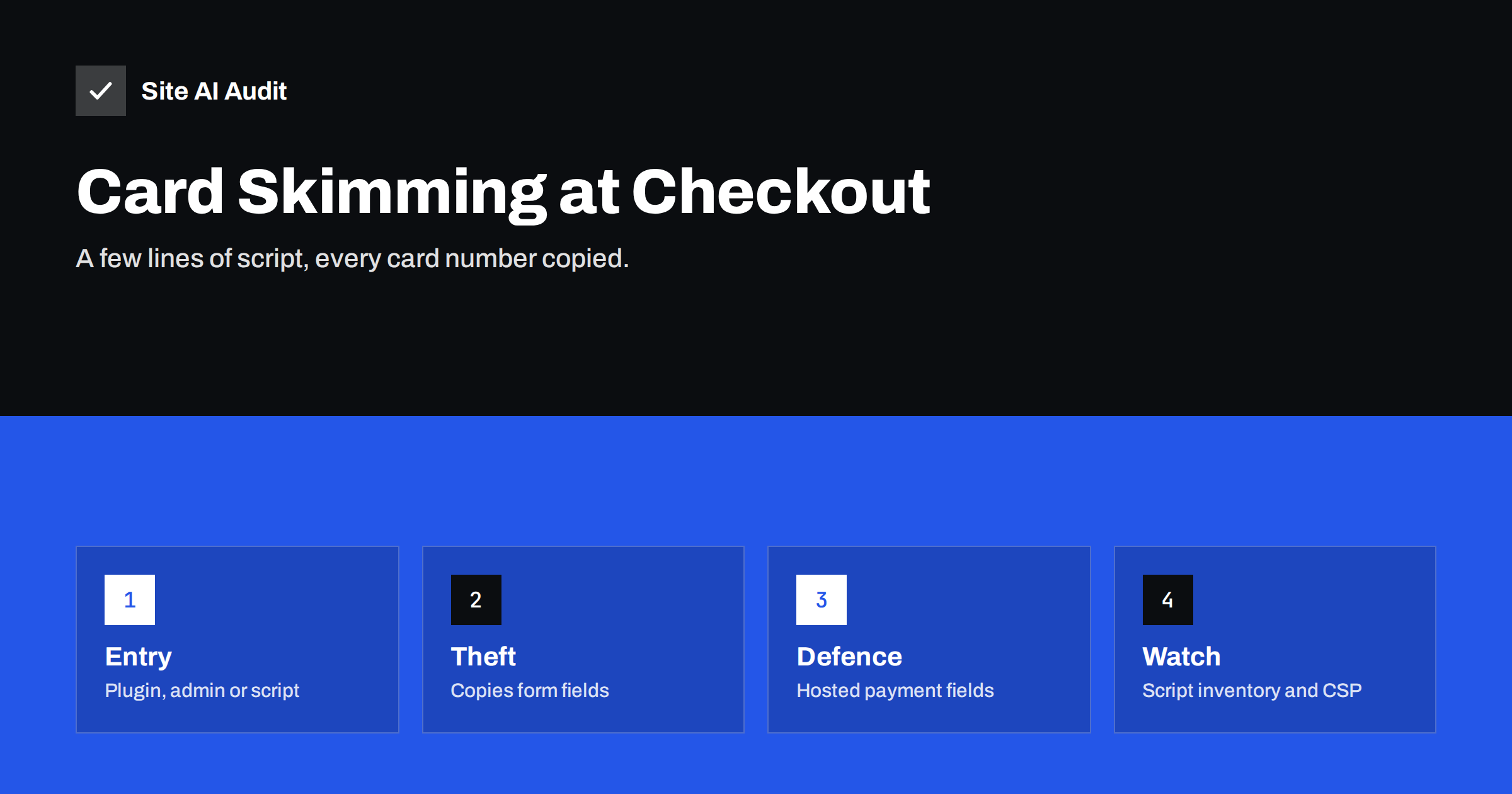
Short answer: Card skimming on websites, often called web skimming or Magecart after the groups that made it famous, is an attack in which criminals insert malicious JavaScript into an online shop’s checkout. The script copies card numbers, names and addresses as customers type them and sends the data to the attacker, while the order goes through normally. Protect your shop by keeping card entry on your payment provider’s hosted fields or payment page, keeping the platform and plugins updated, limiting and monitoring the scripts on checkout pages, using a Content Security Policy and Subresource Integrity, and securing admin access.
How web skimming works
A skimming attack has two parts: getting code onto the checkout page, and getting the data out.
Getting code in. Attackers use the same weaknesses as in other website breaches: an outdated plugin or extension with a known vulnerability, a stolen administrator password, a compromised hosting account or a nulled theme with a hidden backdoor. A second route is the supply chain: instead of breaking into your shop, attackers compromise a third-party script that your shop loads, such as a chat widget, analytics tag or a small library on someone else’s server. Every shop using that script then serves the skimmer.
Getting data out. The injected script listens to the checkout form. When a customer types card details or presses the pay button, it collects the values and sends them to a server controlled by the attacker, often disguised as an image request or an analytics call to a domain that looks harmless. Some variants show a fake payment form on top of the real one and then display an error, so the customer types the details a second time into the genuine form.
The shop owner usually notices nothing. Orders arrive, payments succeed, and the first sign is often a message from a bank or card scheme that your shop is the common point of purchase for a series of fraud cases.
Why small shops are targets
Skimming is often automated. Attackers scan the internet for shops running a vulnerable version of a platform or plugin and infect all of them at once. Small shops are attractive because they update less often, use more plugins per order and rarely monitor their checkout pages. The damage is real: fraud costs, possible fines and assessments from the card schemes, investigation costs, and the loss of customer trust after notifying affected buyers.
Skimming also tends to stay hidden for weeks or months, because the shop keeps working perfectly. That long dwell time is what turns a single infected file into thousands of stolen cards.
The most effective defence: keep card entry off your page
How you take card payments decides how much a skimmer can steal. There are three common set-ups:
- Redirect to a hosted payment page. The customer leaves your site to enter card details on the payment provider’s page. A skimmer on your checkout cannot read those fields, although it could still try to redirect customers to a fake payment page.
- Embedded hosted fields or iframes. The card fields look like part of your checkout but are served from the payment provider’s domain inside iframes. Scripts on your page cannot read their contents. This is the usual set-up for modern payment plugins.
- Card fields directly in your own form. Card data passes through your page’s own HTML and JavaScript, or even your server. Any injected script can read it. Avoid this unless you have a strong reason and the security programme to match.
Moving to hosted fields or a hosted payment page is the single biggest reduction in risk for most shops. It does not make the checkout immune, because attackers can still insert a fake form or alter the redirect, so the other measures below still matter.
Keep the platform, plugins and access secure
- Update the shop platform, payment plugins and all other extensions promptly, especially when an update fixes a security issue. Our guide to a safe update strategy shows how to do this without breaking the shop.
- Remove extensions you do not use. Every plugin is code that runs on your checkout.
- Never use nulled themes or plugins. Pirated premium software is one of the most common carriers of skimmers; see our article on nulled themes and plugins.
- Protect admin accounts with two-factor authentication and give staff only the permissions they need.
- Secure the hosting account, SFTP and database credentials, and do not share them by email.
- Keep backups so you can compare files and restore a clean version.
Control which scripts run on checkout pages
Checkout pages should load as little JavaScript as possible. Make an inventory: open the checkout in your browser’s developer tools, look at the network and sources panels, and list every script and the domain it comes from. For each one, ask whether it is needed during checkout. Chat widgets, heatmaps, social pixels and marketing tags usually are not. Remove them from checkout and payment pages, or load them only on other pages.
For scripts that remain, add two browser-side protections:
- Content Security Policy. A CSP header lists the domains from which scripts may load and to which the page may send data, using directives such as
script-srcandconnect-src. A skimmer that tries to load from or send data to an unlisted domain is blocked, and with a report endpoint you are told about it. Our Content Security Policy guide shows how to start in report-only mode. - Subresource Integrity. For scripts loaded from other servers in a fixed version, the
integrityattribute makes the browser refuse a file that has changed. Our guide to Subresource Integrity explains when this works and when it does not.
Neither protection helps if the attacker can edit your own files and your CSP at the same time, which is why server security comes first. But they block many supply-chain attacks and make injected code easier to notice.
Detect skimming early
- Monitor file changes in the shop’s code, especially templates, JavaScript files and payment plugin folders. Unexpected changes outside update windows deserve a look.
- Check the checkout regularly from a clean browser. Look at the scripts loaded and the requests sent when you type into the form; data sent to an unknown domain is a red flag.
- Collect CSP reports. Violations from the checkout page often show injected code before customers report fraud.
- Look for unknown admin users and unfamiliar database entries in settings that can hold scripts, such as custom header or footer code fields.
- Take bank notifications seriously. A request from your payment provider about possible compromise needs an immediate investigation.
The PCI DSS card security standard, in its version 4, added requirements for managing scripts on payment pages and for detecting unauthorised changes to them. Which requirements apply to your shop depends on how you take payments, so ask your payment provider which self-assessment applies to you.
What to do if you find a skimmer
- Take a copy of the evidence: infected files, database entries and logs, before you remove anything.
- Remove the malicious code and close the entry point: update or remove the vulnerable extension, reset all passwords and remove unknown accounts.
- Inform your payment provider or acquiring bank promptly. They will explain what investigation and notification steps are required.
- Check your legal obligations for notifying customers and data protection authorities, which in the EU follow the GDPR’s breach rules.
- Harden and monitor using the steps above, so the same attack cannot return.
Our hacked website recovery plan covers the technical cleanup in more detail.
How Site AI Audit helps
Site AI Audit checks your shop from the outside and reports the security basics that make an attack harder or easier: a valid SSL certificate and its expiry date, the redirect from HTTP to HTTPS, mixed content, missing security headers such as HSTS, X-Content-Type-Options and frame protection, and whether the server or WordPress reveals its version. It does not scan your checkout scripts for skimming code, so script inventory and file monitoring remain your job or your developer’s. You can run a free check, and the pricing page lists the plans with monitoring.
Related reading
- How Third-Party Scripts Slow Down Your Website (and Fixes)
- Two-Factor Authentication for Website Owners: What to Protect
- Cross-Site Scripting (XSS) Explained for Website Owners
- Website Security for Small Businesses: Where to Start
The bottom line
Web skimming steals card data silently while your shop keeps taking orders. The strongest defence is to keep card entry on your payment provider’s hosted fields or page. Add to that prompt updates, no nulled software, two-factor admin logins, as few scripts on checkout as possible, a Content Security Policy, Subresource Integrity for external files and regular checks for changes. If you do find a skimmer, preserve the evidence, clean up, and tell your payment provider straight away.
FAQ
Can a skimmer steal card data if I use hosted payment fields?
It cannot read the contents of the provider’s iframes, which removes most of the risk. Attackers can still try to overlay a fake form or alter a redirect, so keep checkout scripts and files under control.
How would I know my shop has a skimmer?
Often only through a bank or payment provider notice. Regular checks of the scripts and requests on your checkout page, file change monitoring and CSP reports help you find it sooner.
Does an SSL certificate protect against skimming?
No. HTTPS protects data in transit between the browser and the server, but a skimmer runs inside the page and sends data out over HTTPS too.
Which scripts should I allow on the checkout page?
Only those the checkout needs: your shop’s own code and your payment provider’s scripts. Remove chat, heatmap and marketing scripts from checkout and payment pages.
Is WooCommerce more at risk than other platforms?
Any platform can be attacked. The risk depends mostly on updates, the number and quality of extensions, admin security and how card data is collected.